
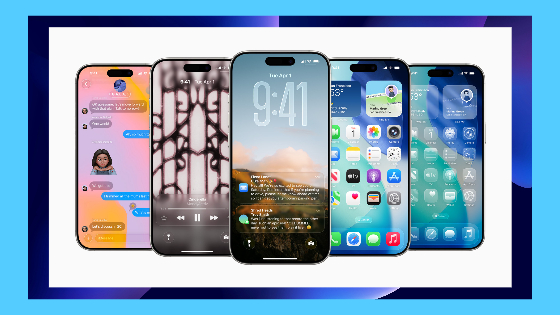
Apple’s latest operating system is now available and promises a completely new user interface, revolutionizing how you interact with your iPhone.
Officially rolled out on Sept. 15, iOS 26 is the 19th iteration of the iPhone’s operating system and the biggest shake up since iOS 7 in 2013.
As part of the update, Apple has standardized its naming convention across platforms. Going forward, iOS, macOS, iPadOS, watchOS and tvOS will carry names aligning with the release year — making iOS 26 the 2026 edition.
Design and interface
The biggest headline from Apple’s Worldwide Developer Conference, where Apple announces all their system changes, was the creation of a new design language. Dubbed “Liquid Glass,” Apple’s 2026 OS updates will carry a unifying visual theme.
In iOS 26, Liquid Glass features translucent, fluid and reflective elements that mimic real glass for an overall simplified experience. Liquid Glass responds to wallpapers, surrounding icons and phone movement, warping and refracting light around various elements on the screen.
Your lock screen will see a vibrant new look with an adjustable clock that dynamically changes in size as you scroll through notifications. Wallpapers can now detect objects in the foreground, placing the clock behind them or creating a simulated spatial scene, giving a mock 3D effect. Further customization allows for lock screen widgets to be placed near the bottom of your screen.
Liquid glass has elongated toggles for an easier touch experience with new graphics. The keyboard is more spaced out which allows for fewer typing inaccuracies. New customization options will come to your home screen with clear and tinted icons for further personalization.
As liquid glass continues to be adopted by developers, its full set of fun features can be best seen on Apple’s core apps.
Core apps
The camera app has seen a complete overhaul aiming to simplify the user experience. Streamlining the user experience, the app now focusses on either photo or video with clutter removed until the user interacts with the app. AirPods can now be used as a shutter button, and your iPhone will offer hints if it suspects smudges or imperfections that affect camera quality.
Photos has been reverted to its previous form, following last year’s iOS 18 update which received a less than warm response. The app now shows two tabs: library and collections. This return to simplicity allows you to easily sort through and find albums and memories.
Apple Music will debut a new auto mix feature which allows for seamless DJ-like transitions between songs. The feature will dynamically speed up or slow down songs, matching beats and isolating layers to create smooth transitions. Spotify users can now easily sync their library to Apple Music through an iOS 18.6 feature in settings.
Long time Mac users will appreciate the addition of Preview to the iPhone and iPad. This app allows you to view, edit and markup pdfs, images and slide shows without needing an additional app. Preview allows you to scan and export images and files to different formats and add pages to existing documents. On iPad, preview will work with Apple Pencil. The app will offer dozens of features previously reserved for Mac or premium iOS apps like Adobe Acrobat.
iMessage will see fun ways to interact with group chats, allowing in-chat polls so plans can finally make it out of the group chat. Users can change the background of chats to saved photos or create an A.I. scene. Live translation will allow you to converse in multiple languages over text. Captioned live translation will be available on FaceTime, with spoken live translation available for phone calls.
Phone calls will be made easier with call screening. This feature will screen calls from numbers not listed in Contacts and potential spam callers. Your iPhone will only ring you if the calls are important. Hold assist will allow your iPhone to wait on hold for you, allowing you to go about your day and ring only once a real person is on the line. When making calls, a haptic buzz will tell you if the person you’re calling has picked up or if the call went to voicemail. Call back reminders can be set for calls you missed — so no need to worry about forgetting to call your grandma back.
Utilities and everyday features
For users with Apple Intelligence, screenshots will offer a new circle to search feature that allows you to learn more about the items on your screen. The feature will also allow you to create calendar events based on dates seen in the image.
Apple Intelligence also allows for adaptive power. The feature will make subtle adjustments when battery usage is higher than normal such as lowering display brightness or slowing down background tasks. This is different to Low Power Mode, which is a blunt tool that reduces overall iPhone performance.
CarPlay will see the same liquid glass design language and options for dark, clear or tinted icons. New backgrounds allow for enhanced personalization and the ability to choose your own images as backgrounds. Widgets will also be coming to CarPlay. Phone calls will appear as a small widget — opposed to taking up the whole screen — and messages will now include Tapback iMessage reactions and pinned conversations. You can also stream videos to your vehicle’s infotainment using airplay while in park.
iPad will see massive Mac like system updates with iPadOS 26. Flexible windowing will improve the already powerful multitasking abilities, allowing you to open multiple windows at once, resize, tile and arrange them in whatever configuration you’d like. iPad will also feature a new PDF indexing and filing system, background tasks for exporting large files and a menu bar like that which is seen on MacOS, which allows you to quickly find the command you need.
Performance and capability
Apple’s latest operating system will be available for iPhones and Apple devices with the Apple neural engine. This includes the second-generation SE joined by iPhones 11 and later. iPadOS 26 will come to iPad Pro and Air 3rd generation or later (2018 and 2019 respectively), iPad mini 5th generation or later (2019) and iPad 8th generation or later (2020).
The company has warned the new update could impact battery life as the new liquid glass interface is more graphically demanding. Immediately after completing the update, temporary impacts on battery life and thermal performance are normal as your phone or tablet works to index data and files, complete downloads and update apps.
Early reactions to iOS 26 have been mixed. Some users praise the sleek new design, while others believe the changes are drastic and introduced ahead of being ready for a full-scale rollout. For those still on the fence, it may be worth waiting for a later update, when Apple inevitably introduces bug fixes and refinements on the user interface and design.
––
iOS 26 reimagines how you interact with your iPhone, blending sleek visuals with practical tools. The new design language sets the tone for the future of iOS, but if your device is already struggling with its current operating system, you may want to weigh the risks before diving in.